Review basis: Research-led; not hands-on. UK Deco BE85 listings can use different regional hardware specifications, so this comparison identifies the version rather than treating every BE85 as identical.
Quick verdict
For most UK homes on 1 Gbps broadband, the TP-Link Deco BE68 is the better-value WiFi 7 starting point because the BE85's clearest advantage is its additional multi-gigabit wired capacity.
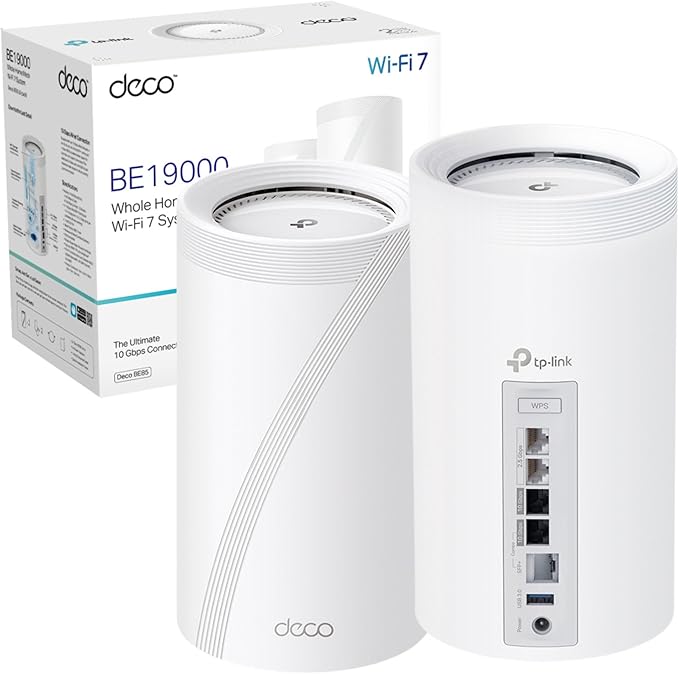
Deco BE85 — the premium choice for homes with multi-gig broadband, a NAS, or a network design that needs multiple 10G handoffs per node. If you already have or plan to install structured wiring and 2.5 Gbps+ internet, the BE85 earns its price with port headroom that the BE68 cannot match.
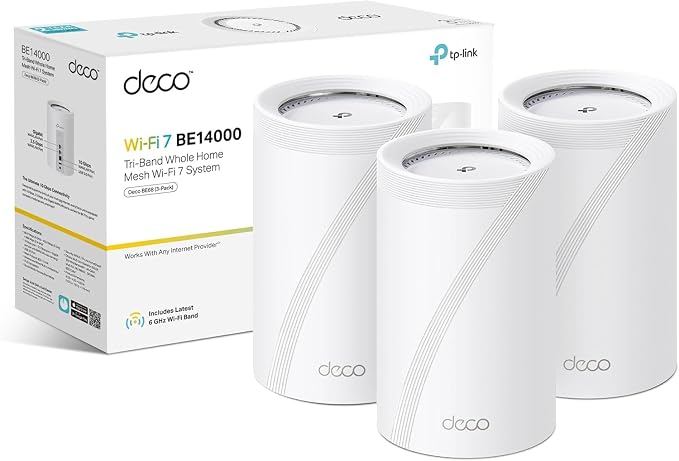
Deco BE68 — the better buy for most UK homes. It keeps tri-band WiFi 7, flexible backhaul, and a 10GbE port. On a 1 Gbps internet plan with standard home usage, the extra BE85 ports may add cost without changing the internet experience.
Because no directly comparable UK head-to-head test establishes a universal wireless advantage, the most defensible deciding factor is how many fast wired connections you need at each node.
Deco BE85 vs BE68: full spec comparison
| Spec | Deco BE85 | Deco BE68 |
|---|---|---|
| WiFi class | BE19000 on the current UK page; BE22000 on older V1 and some regional versions | BE14000 tri-band |
| Bands | 2.4 GHz + 5 GHz + 6 GHz | 2.4 GHz + 5 GHz + 6 GHz |
| Top 6 GHz rate | 11,520 Mbps | 8,647 Mbps |
| MLO support | Yes | Yes |
| Backhaul options | Wireless, Ethernet, or combined backhaul | Wireless, Ethernet, or combined backhaul |
| Ethernet ports per node | 1x 10GbE RJ45/SFP+ combo + 1x 10GbE + 2x 2.5GbE | 1x 10GbE + 1x 2.5GbE + 1x 1GbE |
| Manufacturer coverage claim | The current UK page focuses on 1- and 2-pack listings; do not compare an older 3-pack figure directly | Up to 8,100 sq ft for 3 units; actual coverage varies |
| Manufacturer device claim | 200+ under TP-Link test conditions | Up to 200 under TP-Link test conditions |
| Node dimensions | 5.04 x 5.04 x 9.29 in (tall tower) | 4.23 x 4.23 x 6.93 in (compact tower) |
| VPN support | Yes (client + server) | Yes (client + server) |
| Smart home | Alexa + Google Home | Alexa + Google Home |
| HomeShield | Included and paid features; current plan and mode apply | Included and paid features; current plan and mode apply |
| Current bundle price | Check the exact hardware version and pack size | Compare the same pack size and current seller |
The real difference: ports, not WiFi speed
On paper the BE85 has a higher WiFi class than the BE68, although the exact BE85 class depends on region and hardware version. That aggregate number does not predict one client's speed. Both offer tri-band WiFi 7, MLO, and flexible backhaul; the client, walls, node placement, and wired path still determine the result.
The actual differentiator is the wired side. The BE85 gives you four multi-gig ports per node (including an SFP+ combo port), which means you can simultaneously connect a 10G switch uplink, a NAS, and wired satellites without running out of fast ports. The BE68 has one 10GbE, one 2.5GbE, and one Gigabit — perfectly capable, but you need to plan your wired topology more carefully.
If your network design starts with "I need a 10G switch feeding two or more wired branches," choose the BE85. If it starts with "I want whole-home WiFi 7 with one wired connection to my ISP router," choose the BE68.
How to interpret the performance difference
We did not find directly comparable UK lab results for the BE85 and BE68 under one test method, so assigning a universal percentage advantage would be misleading. Use the following factors to judge which system can benefit your home:
| Scenario | What matters most | Practical implication |
|---|---|---|
| Same-room WiFi 7 client | Client radio, 6 GHz channel conditions, and the wired uplink | Both need compatible hardware before their headline radio capacity becomes useful. |
| Across a floor or dense wall | 6 GHz attenuation and node placement | A higher WiFi class does not remove the range limits of 6 GHz. |
| Ethernet backhaul | Port speed, cabling, and switches in the full path | The BE85 is easier to integrate when several fast wired handoffs are needed per node. |
| Fast NAS transfers | NAS, storage, switch, adapter, and client limits | The BE85 has more port headroom, but every device in the chain must support it. |
For attributed independent BE85 measurements and the UK BE19000/BE22000 version distinction, read our full Deco BE85 review.
Backhaul strategy: the most important decision
A wired Deco BE68 can be more consistent across difficult floors and walls than a poorly placed Deco BE85 relying only on wireless backhaul.
The single decision that affects real-world mesh performance more than choosing between BE85 and BE68 is whether you wire the backhaul.
- Most predictable: Ethernet backhaul removes the wireless hop between nodes. Final speed still depends on the selected ports, cabling, switches, adapters, clients, and storage.
- Possible retrofit: MoCA can use suitable existing coax, but adapters, coax topology, filters, and other services determine whether it is practical.
- Wireless option: Both systems support wireless and combined backhaul, but dense walls, floors, interference, and node placement still reduce throughput.
If the choice is between a higher hardware tier and installing a reliable Ethernet path between floors, prioritise the backhaul when the property allows it. Better placement and a stable wired path often matter more than the larger aggregate WiFi number.
Which configuration checks matter?
Do not copy a universal channel-width recipe from another home. Available controls can change with firmware and region, while nearby networks, radar events, client support, and backhaul determine whether a wider channel helps.
- Update firmware, then record the current configuration before changing one variable at a time.
- Test a wired client at the gateway first so an ISP or Ethernet limit is not mistaken for a WiFi problem.
- Compare the same WiFi client in the same rooms on the gateway and satellite nodes.
- Use the Deco app's connection information to check which node and band the client actually selected.
Keep the configuration that improves repeatable room-level results, not the one that displays the largest theoretical channel figure.
Node placement in UK homes
Both the BE85 and BE68 follow the same placement rules:
- Place the gateway node centrally, near the ISP router and the main wired backhaul riser.
- Put satellite nodes near stair landings or hallway junctions — not in far corners or closed cupboards.
- Keep nodes elevated (shelf height, not floor level) and away from metal objects, mirrors, and large TVs.
- Use the fewest nodes that provide a strong upstream link and cover the rooms that matter; node count cannot be prescribed from floor count alone.
The BE85 is physically larger (9.3 inches tall vs 6.9 inches for the BE68). In homes with shallow shelves or built-in cabinetry, the BE68 is easier to place discreetly.
Is HomeShield a reason to choose one?
HomeShield is not the main hardware divider between BE85 and BE68. Both use TP-Link's service, but included and paid features can vary by firmware, region, operating mode, and the current plan. Check the live HomeShield comparison if a specific parental-control, security, or reporting feature affects the purchase.
Who should buy which?
Choose Deco BE85 if:
You have 2.5 Gbps+ broadband, a 10G NAS or switch, or need multiple fast wired connections at each node. Your network is already wired or you are investing in structured cabling.
Choose Deco BE68 if:
You want WiFi 7 but one 10GbE and one 2.5GbE port per node are enough. Compare the same pack size and current price rather than assuming a universal value winner.
When to skip both and stay on WiFi 6
- Your broadband is under 500 Mbps and you have no multi-gig local devices — the Deco X50 or X55 is more cost-effective.
- Your home is small enough that a 2-pack WiFi 6 mesh covers everything — no need for WiFi 7 overkill.
- You have no WiFi 7 devices and no near-term plans to buy any — the benefits are unrealised.
For a detailed look at the WiFi 6 options: Deco X50 review · Deco X55 review
Sources and evidence
- TP-Link UK Deco BE85 product page — current UK wireless class, ports, pack options, backhaul, dimensions, and manufacturer claims.
- TP-Link UK Deco BE68 product page — BE14000 specifications, ports, backhaul, and manufacturer claims.
- TestedHarbor Deco BE85 research review — regional version checks and attributed independent BE85 evidence.
- TestedHarbor Deco BE68 research review — attributed independent BE68 evidence and UK ISP setup guidance.
- TP-Link Deco model compatibility guidance — mixing Deco models and selecting the main unit.
Sources were checked on July 31, 2026. Hardware versions, firmware, retailer packs, and HomeShield plans can change.
Frequently asked questions
What is the main difference between Deco BE85 and BE68?
The current UK BE85 has a higher wireless class and more multi-gigabit ports: two 10G-class and two 2.5GbE connections per node, versus one 10GbE, one 2.5GbE, and one Gigabit port on BE68. Without a controlled UK head-to-head test, the wired layout is the clearest verified divider.
Is the BE85 worth the extra cost?
It is worth considering when you need multiple fast wired connections per node for a NAS, multi-gig broadband, switching, or wired backhaul. If one 10GbE and one 2.5GbE port are enough, the BE68 usually avoids paying for unused wired capacity.
Do both support wired backhaul?
Yes. Both support Ethernet backhaul and supported combined wired-and-wireless backhaul. The BE85's additional multi-gig ports make complex wired layouts easier, but actual speed still depends on every cable, switch, adapter, and device in the path.
Should I wire the backhaul or buy the more expensive model?
Prioritise reliable backhaul and placement before moving up a hardware tier. Ethernet removes the wireless hop between nodes, but it does not guarantee a specific speed because ports, cabling, switches, clients, and radio conditions still limit the result.
Can I mix BE85 and BE68 nodes?
Yes, TP-Link says Deco models are compatible in one mesh. The selected main Deco and slower nodes can affect features and performance, so a mixed system should not be assumed to provide BE85 capability at every node.
Is WiFi 7 worth upgrading to in 2026?
WiFi 7 is most useful with compatible clients, gigabit or multi-gigabit networking, and a genuine coverage or capacity problem. If the current WiFi 6 mesh works well, there is no urgent reason to replace it.
Compare both models on Amazon UK
Pricing, bundles, and availability change frequently. Check both before deciding.
Affiliate disclosure: we may earn a commission if you purchase through these links. Prices and availability can change.
Compare premium WiFi 7 with less expensive router and mesh options for UK homes →
Want the full single-model breakdown? Read the Deco BE85 review · Read the Deco BE68 review