Review basis: Research-led; not hands-on. TestedHarbor has not measured X55 throughput or coverage. Official TP-Link UK pages support specifications and compatibility; independent observations are clearly attributed.
The TP-Link Deco X55 is a sensible WiFi 6 mesh when a three-unit AX3000 kit is competitively priced and Gigabit Ethernet is enough for the network. Its strongest case is simple whole-home coverage with optional wired backhaul, not a unique performance advantage over every other AX3000 Deco.
Do not choose it because a listing promises 6,500 sq ft, 150 devices, or guaranteed seamless roaming. Those are manufacturer claims or environment-dependent outcomes. Choose it after checking the exact pack, hardware version, home layout, ISP mode, and current X50 price.
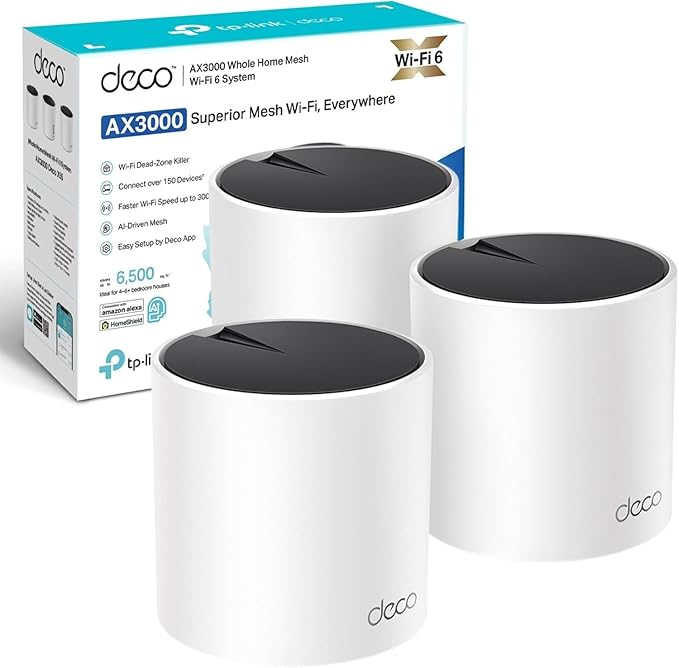
Quick verdict
Buy the X55 when you need an easy three-node WiFi 6 mesh and can use Ethernet backhaul in difficult areas. Skip it as an “upgrade” from a working X50, because current UK official pages show extensive overlap in their core specifications. For multi-gig ports, 6 GHz, or heavy wireless backhaul demand, move to a different hardware class rather than expecting the X55 name to solve it.
What are the Deco X55 specifications?
The following figures come from TP-Link's current UK product page. Wireless rates, coverage, and device capacity are theoretical or manufacturer-rated values, not TestedHarbor measurements.
Deco X55 vs X50: what is actually different?
The current UK product pages do not support calling the X55 categorically faster or more capable than the X50. Both list AX3000 dual-band WiFi 6, 2,402 Mbps on 5 GHz plus 574 Mbps on 2.4 GHz, three Gigabit ports per unit, Ethernet backhaul, up to 150 devices, and Alexa support.
Product names can persist across hardware revisions, regions, and retailer bundles. The practical comparison is therefore the exact model revision, number of nodes, included power supplies, seller, warranty, return terms, and current price. If a comparable X50 pack costs less, there may be no reason to pay more for X55.
Choose X55
The exact X55 pack has the better current price or warranty, you need its included node count, and Gigabit ports satisfy both internet and wired-backhaul plans.
Choose X50
The equivalent current X50 hardware and pack costs less or is easier to source. Read our Deco X50 review before treating either name as the automatic winner.
What performance evidence is available?
Independent X55 testing is useful only when its internet service, client, layout, and node placement are disclosed. Windows Central reported stable whole-home coverage and a large improvement over the reviewer's previous powerline connection in one home, but the test was constrained by roughly 100 Mbps internet service. It does not prove a universal top-end throughput or “60–80% two rooms away” rule.
For this dual-band system, a wireless satellite must use the same two bands available to clients. Under load, that shared airtime can reduce capacity compared with a well-designed wired backhaul. The amount is environment-specific; there is no honest fixed percentage.
Will a three-pack cover a large UK home?
TP-Link advertises up to 6,500 sq ft for three units, but square footage is not a floor plan. Victorian brick, stone cottages, foil-backed insulation, reinforced floors, mirrors, and extensions can create difficult links even in a much smaller area.
Place the gateway where the broadband enters, then put each satellite where it still has a good upstream connection. A node inside a dead zone cannot relay capacity it does not receive. If Ethernet is available between floors or extensions, wired backhaul is the more predictable fix.
How should you set up Deco X55 with a UK ISP hub?
Decide whether the ISP hub or Deco will route the network. Simply disabling the hub's WiFi does not disable its router, DHCP, or NAT functions.
- Deco in Router mode: Prefer bridge or modem mode on the ISP hub where supported. Otherwise, two routers can create double NAT.
- Deco in Access Point mode: Keep the ISP hub as router and use Deco for WiFi. This avoids double NAT but removes some Deco gateway features.
- Provider-specific setup: Virgin Media, BT, and Sky use different hubs and service arrangements. Follow TP-Link's current guide for the exact provider and service.
The app guides node addition, but setup time depends on firmware updates, account creation, ISP configuration, and cable routing. A fixed “under 10 minutes” promise is not defensible.
Will devices roam seamlessly between X55 nodes?
Deco provides one network name and supports mesh steering features, but the client device ultimately decides when to roam. Phones, laptops, cameras, and older IoT devices can behave differently. Good placement and current client drivers improve the odds; no mesh system can guarantee that every device changes nodes without a visible interruption.
What should you know about HomeShield?
HomeShield features are divided between included and paid tiers, and availability can vary with firmware, region, mode, and current TP-Link plans. Treat parental controls, security tools, and reports as software services that may change rather than permanent hardware specifications. Check the current plan before buying for one specific feature.
How does X55 compare with other options?
| Option | What changes | Best fit |
|---|---|---|
| Deco X55 | AX3000 dual-band WiFi 6, three Gigabit ports per node | A competitively priced three-node kit where Gigabit and optional wired backhaul are enough. |
| Deco X50 | Current UK headline specifications overlap heavily with X55 | Buy the equivalent pack when its price, revision, seller, or warranty is better. |
| Deco XE75 | Adds a 6 GHz band but remains limited by the exact port configuration | Homes needing additional wireless-band capacity and compatible 6 GHz clients. |
| Deco BE68 | WiFi 7, 6 GHz, MLO, 10GbE and 2.5GbE ports | Multi-gig networks or homes with a justified WiFi 7 and wireless-capacity requirement. |
Who should buy the Deco X55?
- Homes replacing a single ISP router that leaves repeatable dead zones.
- Buyers who need a three-node pack and find the X55 cheaper than an equivalent current X50 offer.
- Networks where Gigabit ports and WiFi 6 are sufficient for the broadband plan and local devices.
- Properties that can use Ethernet backhaul across a difficult floor, wall, or extension.
Who should skip it?
- Homes already covered well by a working Deco X50 or another AX3000 mesh.
- Users who need 2.5GbE or faster wired ports.
- Buyers expecting Google Home support from a UK specification page that only lists Alexa.
- Properties where the real problem is poor node placement, double NAT, or an ISP line fault rather than mesh hardware.
Sources and evidence
- TP-Link UK Deco X55 product page — official wireless, port, mode, coverage, device, and Alexa claims.
- TP-Link UK Deco X50 product page — current headline specifications used in the X50 comparison.
- Windows Central Deco X55 review — attributed home-use observations, with service-speed limitation.
- TP-Link Router mode vs Access Point mode guidance and provider pages for BT, Sky, and Virgin Media.
- TP-Link Deco model compatibility guidance — mixing models and main-unit considerations.
Sources were checked on July 31, 2026. Hardware revisions, firmware, HomeShield plans, retailer bundles, and ISP procedures can change.
Frequently asked questions
What is the difference between Deco X55 and Deco X50?
The current UK product pages list very similar headline specifications: AX3000 dual-band WiFi 6, three Gigabit ports per unit, Ethernet backhaul, and Alexa support. Compare the exact hardware version, pack size, seller, warranty, and price instead of assuming one is categorically faster.
Does the Deco X55 work with Alexa and Google Home?
TP-Link's current UK Deco X55 page lists Alexa support. It does not list Google Assistant or Google Home support, so this review does not claim it. Available voice commands can also depend on region, firmware, and account configuration.
Will a Deco X55 three-pack cover a large UK home?
TP-Link advertises up to 6,500 sq ft for a three-pack, but that is a manufacturer estimate rather than a guarantee. Thick stone, foil-backed insulation, reinforced floors, interference, and poor node placement can reduce coverage substantially.
Can I add other Deco units to an X55 mesh?
Yes, TP-Link says Deco models are compatible within one mesh. The main unit and slower nodes can affect which features and performance are available, so mixing models does not turn every room into an X55-class connection.
Does Deco X55 work with BT, Sky, and Virgin Media?
It can work with major UK providers, but the correct setup depends on the service and hub. Use bridge or modem mode where supported, or use Deco Access Point mode behind the ISP router. Leaving both in router mode can create double NAT.
Compare the exact X55 and X50 offers
Check pack size, hardware version, seller, warranty, and price before treating either AX3000 Deco as the better deal.
Read the Deco X50 review · Compare current UK router and mesh picks