Review basis: Research-led; not hands-on. TestedHarbor has not performance-tested the BE68. Official TP-Link material supports specifications and compatibility; attributed independent tests support the performance observations below.
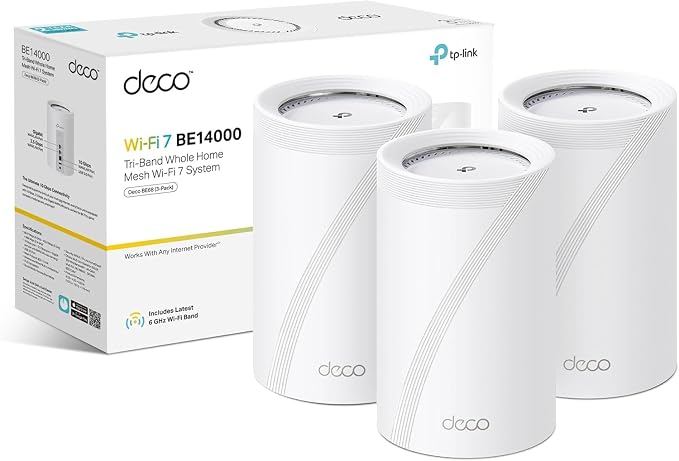
The TP-Link Deco BE68 is best suited to UK homes that can use its multi-gig ports, WiFi 7 clients, and three-band mesh capacity. It is not an automatic upgrade for a home on 100–500 Mbps broadband, and its “up to” coverage and device figures are manufacturer laboratory claims rather than measured household guarantees.
The BE68's practical advantages over a dual-band WiFi 6 system are its 6 GHz radio, MLO support, one 10GbE and one 2.5GbE port per node, and more backhaul options. Its limits are equally important: 6 GHz weakens rapidly through walls, wireless satellites do not automatically match the gateway, and a poorly configured ISP hub can create double NAT.
Quick verdict
Buy the Deco BE68 when your current mesh is the bottleneck and you have the clients, broadband, or local network to use the extra capacity. Prefer Ethernet backhaul where possible. Skip it when a stable WiFi 6 mesh already delivers your internet speed, because WiFi 7 labels and aggregate BE14000 capacity do not create a visible benefit by themselves.
What are the Deco BE68 specifications?
The following figures come from TP-Link's UK product page. Wireless rates, coverage, and device capacity are theoretical or manufacturer-rated values, not TestedHarbor measurements.
What did independent Deco BE68 testing find?
Independent tests agree on the broad pattern: the BE68 can be very fast near a capable node, but 6 GHz and wireless backhaul still lose performance with distance and obstructions. Test methods, regional hardware, client devices, and homes differ, so the figures below should not be combined into a single score.
T3 home test
T3 used a three-unit system for several weeks with dozens of devices and reported no speed or latency problem in that home. It described a substantial improvement over the reviewer's previous router, without claiming a universal throughput figure.
Dong Knows Tech test
Testing of the BE14000 Deco 7 Pro family recorded more than 3 Gbps at close range on 6 GHz with a 10G uplink. Rates fell materially with distance, and wireless-satellite results were below gateway results. A multi-day stress test reported no disconnection.
PC Gamer iPerf test
PC Gamer found strong close-range throughput but a rapid 6 GHz decline through distance and walls. Adding a second node improved far-location results in that test environment, illustrating why placement can matter more than the headline wireless class.
Dong Knows Tech tested a US BE14000 Deco 7 Pro variant in the same BE67/BE68 family. Its directional findings are useful, but regional firmware and hardware naming mean the numbers should not be treated as a controlled UK BE68 benchmark.
Does tri-band mean dedicated 6 GHz backhaul?
No. The BE68 does not permanently reserve its 6 GHz radio only for node-to-node traffic. Deco dynamically selects links and can use wireless bands, Ethernet, or supported combined backhaul. Client and mesh traffic may still share radio capacity, so “tri-band” should not be rewritten as “zero backhaul bottleneck.”
Ethernet is the most predictable choice across dense walls and floors because it removes the wireless hop between nodes. Wireless backhaul remains useful where cabling is impractical, but satellites need a strong link to the gateway or another node. Do not place a satellite inside the dead zone it is meant to fix.
How much area will a Deco BE68 actually cover?
TP-Link advertises up to 8,100 sq ft for a three-pack, but the company also says actual coverage varies by building materials, layout, interference, traffic, client limits, and placement. A square-foot figure cannot tell you whether 6 GHz crosses a stone wall, a foil-backed extension, or a reinforced floor.
Start with the fewest nodes that cover the home, place satellites where they still receive a strong upstream link, and test the rooms that matter. Too many closely spaced nodes can add unnecessary roaming and interference complexity.
When do the 10GbE and 2.5GbE ports matter?
You do not need 10 Gigabit internet to use the 10GbE port. It can connect a fast switch, NAS, workstation, or wired backhaul. However, the end-to-end path determines speed: modem or ONT, switch, cable, storage, client adapter, and application all need adequate capacity.
The BE68 has one 10GbE, one 2.5GbE, and one Gigabit port per unit. If the design needs several multi-gig wired handoffs at every node, compare the Deco BE85 and BE68 before adding external switches.
How should you connect it to BT, Sky, or Virgin Media?
Choose who will act as the router before setup. Disabling the ISP hub's WiFi does not by itself stop routing or avoid double NAT.
- ISP hub in bridge or modem mode: Use Deco Router mode when the provider and hub support this arrangement. Virgin Media documents modem mode for compatible hubs.
- ISP hub remains the router: Use Deco Access Point mode to avoid a second NAT layer. Some Deco gateway features are unavailable in Access Point mode.
- Provider-specific connection: BT and Sky configurations can depend on service type and hub model. Follow TP-Link's current provider guide rather than copying generic login settings.
After installation, verify that port forwarding, online gaming, VPN access, and any ISP phone or TV service still work as expected.
Deco BE68 vs X50, X55, and BE85
| Model | What it offers | Choose it when |
|---|---|---|
| Deco BE68 | Tri-band WiFi 7, 10GbE + 2.5GbE + Gigabit per node | You need WiFi 7, multi-gig wired headroom, and more wireless capacity. |
| Deco X50 | Dual-band AX3000 WiFi 6 and three Gigabit ports per node | A less expensive WiFi 6 mesh already matches the broadband plan and clients. |
| Deco X55 | Dual-band AX3000 WiFi 6 and three Gigabit ports per node | The exact X55 pack, hardware version, seller, or price is better than the comparable X50 offer. |
| Deco BE85 | Higher WiFi class and more multi-gig ports, with regional hardware variants | You need multiple 10G-class wired connections per node and can verify the exact UK version. |
Who should buy the Deco BE68?
- Homes with gigabit or multi-gig broadband that cannot reach that service reliably through the current mesh.
- Users moving large files to a multi-gig NAS or workstation over a properly designed wired and wireless path.
- Households adding WiFi 7 clients and willing to optimise node placement or install Ethernet backhaul.
- Buyers who need one 10GbE and one 2.5GbE handoff at a node without moving to the more expensive BE85 tier.
Who should skip it?
- Homes where an existing WiFi 6 mesh already covers every important room at the broadband plan's full practical speed.
- Smaller properties on modest broadband with no multi-gig local network.
- Buyers expecting 6 GHz to travel farther through walls than 5 GHz.
- Anyone unwilling to plan ISP mode, node placement, and backhaul before judging the hardware.
Sources and evidence
- TP-Link UK Deco BE68 product page — official specifications, manufacturer coverage and capacity claims, ports, modes, and features.
- T3 Deco BE68 review — attributed multi-week home-use observations.
- Dong Knows Tech BE14000 review — attributed throughput and stress-test observations, with regional caveat.
- PC Gamer Deco BE68 review — attributed iPerf observations on range and additional-node placement.
- TP-Link Router mode vs Access Point mode guidance and provider-specific setup pages for BT, Sky, and Virgin Media.
Sources were checked on July 31, 2026. Product firmware, HomeShield features, bundles, and provider procedures can change.
Frequently asked questions
Is the Deco BE68 worth buying in the UK?
The Deco BE68 is worth considering when you have gigabit or multi-gigabit networking, WiFi 7 clients, and a real mesh coverage or capacity problem. It is difficult to justify for a smaller home on modest broadband when a less expensive WiFi 6 Deco already covers it well.
Does the Deco BE68 have a dedicated 6 GHz backhaul band?
No fixed radio is reserved only for backhaul. Deco can use wireless bands and, on supported configurations, combine wired and wireless links dynamically. Client and mesh traffic can still share radio resources, so Ethernet remains the most predictable backhaul.
What Ethernet ports does each Deco BE68 have?
TP-Link lists one 10GbE port, one 2.5GbE port, and one Gigabit Ethernet port on each BE68 unit. The complete path, including modem, switches, cabling, NAS, and client adapters, must support the target speed.
Does the Deco BE68 work with older Deco models?
Yes, TP-Link says Deco models can be mixed in one system. However, the main Deco and slower nodes can limit available features or performance, so a mixed mesh should not be assumed to deliver BE68-class capability everywhere.
How does the Deco BE68 compare with the Deco X50?
The BE68 adds tri-band WiFi 7, 6 GHz, MLO, and 10GbE and 2.5GbE ports. The X50 is dual-band WiFi 6 with Gigabit ports. The BE68 has more capacity and wired headroom, but neither manufacturer's coverage claim predicts performance in a specific home.
How should I connect Deco BE68 to a UK ISP router?
Use bridge or modem mode where the ISP hub supports it, or run Deco in Access Point mode behind the existing router. Leaving both devices in router mode can create double NAT. Access Point mode avoids that but disables some Deco gateway features.
Check the exact BE68 bundle before buying
Compare the current pack size, seller, warranty, and price. Do not size the system from the advertised square-foot figure alone.
Compare current router and mesh options for UK homes · Compare Deco BE85 vs BE68